Jan Soochna Portal is Rajasthan Government’s public information platform for finding details about government schemes, beneficiaries and available departmental records. It helps residents look for information related to ration cards, social security pensions, MGNREGA, Palanhar, labour cards, Jan Aadhaar and other listed services.
Start by choosing what you need: information about a scheme, your own record, a beneficiary list or an available application or payment status. These are different searches, and the details required depend on the service you select.
Jan Soochna Portal: Official Links and Useful Services
Use the links below to reach the relevant government portal. Jan Soochna directory links open sections of the public information portal; departmental links open separate government websites.
| What do you need? | Official link |
|---|---|
| Open the public information portal | Jan Soochna Portal Rajasthan |
| Browse schemes | Jan Soochna Scheme Directory |
| Find a government department | Jan Soochna Department Directory |
| Browse information services | Jan Soochna Service Directory |
| Find ration and food security services | Rajasthan Food Department |
| Access social security pension services | Rajasthan Social Security Pension Portal |
| Find MGNREGA information and reports | Rajasthan MGNREGA Portal |
| Access Jan Aadhaar information and updates | Rajasthan Jan Aadhaar Portal |
| Find labour registration and scheme information | Rajasthan Labour Department |
| Check a listed Social Justice Department application | SJMS Application Status |
| Access land records and Jamabandi services | Apna Khata Rajasthan |
| Find e-Mitra services | Rajasthan e-Mitra |
| Raise a government service grievance | Rajasthan Sampark |
| Read the government instructions | Jan Soochna User Manual PDF |
If a direct page does not open: return to the main Jan Soochna website and search for the department, scheme or service name. Internal links and menu labels can change when the portal is updated.
What Is Jan Soochna Portal?
Jan Soochna Portal brings information from participating government departments into a public-facing platform. Its purpose is to make records easier to find and support transparency in the delivery of schemes and public services.
The Rajasthan Government launched the portal on 13 September 2019. It supports the proactive disclosure principle under Section 4(2) of the Right to Information Act, 2005: public authorities should publish more information themselves so people need to rely less on individual information requests.
Depending on the service, users can find personal records or information about their locality, such as a ward or gram panchayat. doitc.rajasthan.gov.in
| Detail | Information |
|---|---|
| Portal name | Jan Soochna Portal |
| State | Rajasthan |
| Launched | 13 September 2019 |
| Purpose | Public access to scheme information and departmental records |
| Main uses | Scheme searches, beneficiary information and available status reports |
| Access | Internet-connected mobile phone or computer |
| Language options | Hindi and English options available on the portal |
| Official website | jansoochna.rajasthan.gov.in |
Department, scheme and information-service totals are different measures. One scheme can have several information services. Refer to the official dashboard for its displayed totals rather than relying on an old count in an article.
Understanding the Portal’s Main Options
The government’s user manual describes four main functions:
| Option | What it helps you find |
|---|---|
| Information of schemes | Rules, documents and procedures |
| Scheme beneficiaries | Available beneficiary records |
| Scheme eligibility | Potential eligibility based on supplied details |
| Scheme penetration | Geographical beneficiary coverage |
An eligibility result is not a sanction order. Applications and verification follow the relevant department’s process. Menu labels may change as the portal is updated. jansoochna.rajasthan.gov.in
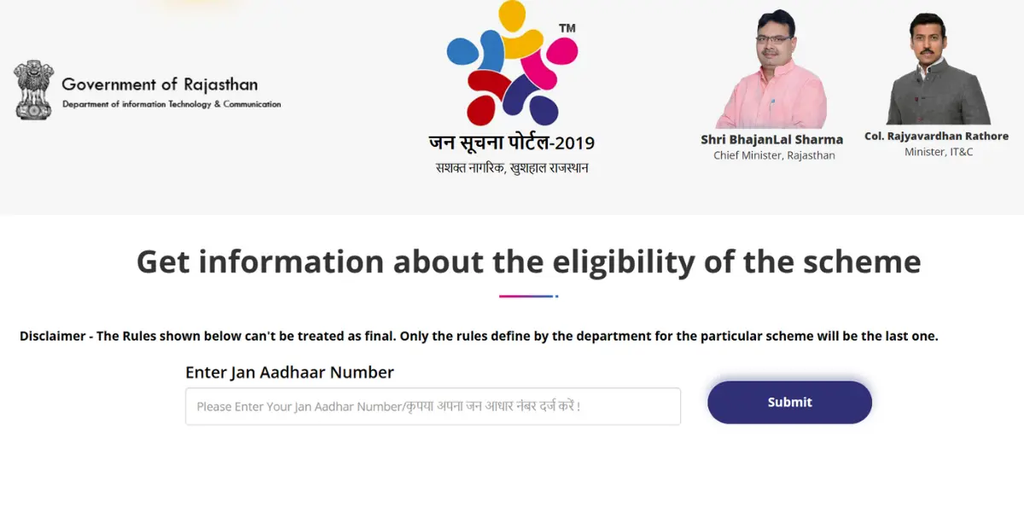
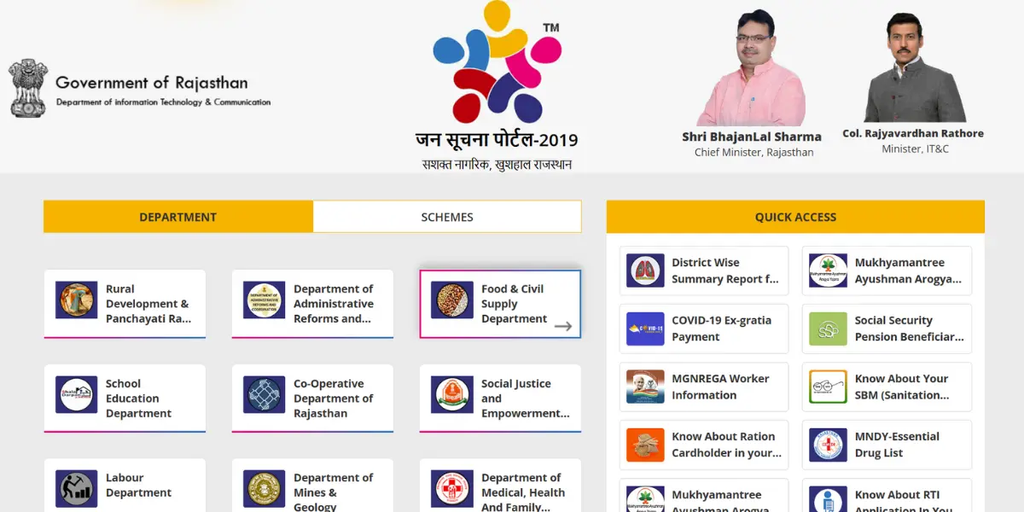
How to Search for Information on Jan Suchna Portal
- Open the official Jan Soochna website.
- Choose the available department, scheme or service directory.
- Search for the scheme or service you need.
- Select the relevant information option.
- Enter only the details requested on that form.
- Review the result, including the person, location and reporting period.
If you cannot find a scheme using one spelling, try its Hindi or English name, or browse the department responsible for it. For example, look under Food and Civil Supply for ration-related information or Social Justice and Empowerment for the relevant welfare schemes.
The department directory covers areas including rural development, education, labour, revenue, health and energy.
Main Schemes and Records You Can Look For
| Scheme or service | Information to look for |
|---|---|
| Public Distribution System | Individual ration card and area-wise cardholder information |
| NFSA | Available approved, pending or rejected beneficiary records |
| Social security pension | Pension details, beneficiaries and available payment information |
| MGNREGA | Worker information and listed work or payment reports |
| Palanhar | Application status, eligibility rules and beneficiary records |
| Labour cards | Cardholder records and labour scheme information |
| Jan Aadhaar | Area-wise information and benefits distributed to families |
| Scholarships | Records listed by the relevant education or welfare department |
| e-Mitra | Kiosks, applications, service rates and related information |
| e-Panchayat | Work progress, panchayat budgets and reports |
| SBM sanitation | Area-wise sanitation beneficiaries and social audit information |
| Land records | Listed Jamabandi, Girdawari and revenue information |
| School education | Available school, enrolment and education-related records |
| Electricity | Listed consumer and bill-related records for the relevant company |
| Health | Listed health scheme, beneficiary, medicine or investigation information |
| RTI | Available application-status and reporting services |
| Unemployment allowance | Listed application-status information |
The availability of an individual record depends on the service and the information supplied by the responsible department.
How to Check Ration Card and NFSA Information
For ration-related searches, find the Public Distribution System or ration section. Choose the service that matches your question.
- Your ration card: use the individual record option and enter the details requested.
- Cardholders in your locality: use an area-wise option and select the available location filters.
- Food security records: look for the relevant NFSA beneficiary service.
Do not assume that finding a ration card record proves approval under every food security category. For applications and departmental services, visit the Rajasthan Food Department. jansoochna.rajasthan.gov.in
Jan Soochna Portal Pension Details and Payment Information
Search for Social Security Pension Beneficiary Information. The listed services include pension eligibility, individual details, area-wise beneficiaries and beneficiary payment information.
Choose personal details when you need your own pension record. Choose an area-wise list when you want to look for beneficiaries in a locality. Use the payment option, where available, for the relevant period.
For further departmental services, visit the Rajasthan Social Security Pension Portal. Social security pensions and government employee retirement pensions use different administrative services. jansoochna.rajasthan.gov.in
If a payment appears missing, compare the correct month’s departmental record with the actual bank statement. Approval, payment processing and a bank credit are separate events.
How to Find MGNREGA Information
Find MGNREGA in the scheme directory and select the relevant worker or report service. Available information includes work progress, active job cardholders and muster-roll reports; location filters help narrow the search. jansoochna.rajasthan.gov.in
The MGNREGA service listing also includes payment-related information such as FTO tracking, Aadhaar-based payment and other reports. Check the financial year shown on each report: a historical report should not be treated as a current-year result. jansoochna.rajasthan.gov.in
For departmental information, use the Rajasthan MGNREGA Portal.
When investigating an individual wage payment, identify the correct worker, work and period. A panchayat-level work report alone does not establish that money reached a particular bank account.
How to Check Palanhar Application Status
Search for Palanhar Yojana and Beneficiaries Information. Its listed services cover application status, eligibility rules, social audit information and district-wise beneficiary records.
Select the personal application service for your own case or the relevant list for area-level information. Enter the details requested by the selected form.
If the application shows an objection, note the message before seeking a correction. Contact the responsible Social Justice and Empowerment office or an authorised e-Mitra centre for the applicable process.
Read Palanhar scheme information from the department and check current orders before relying on an assistance amount quoted in an older article. jansoochna.rajasthan.gov.in
Labour Card and Labour Department Scheme Information
The labour card services include individual card information, area-wise cardholder records, employer information and labour schemes.
First decide whether you need to check a registration or a separate benefit application. Having a labour card record does not automatically establish approval for every labour welfare scheme.
For registration, scheme rules and departmental services, visit the Rajasthan Labour Department. jansoochna.rajasthan.gov.in
How to Find Scholarship Information
Choose the relevant scholarship and department. School education, higher education and social welfare scholarship records should not be treated as one interchangeable list.
Check the academic session, scheme name and department before drawing a conclusion. Not finding a student in an older year’s beneficiary list does not determine the status of a current application. jansoochna.rajasthan.gov.in
For a listed Social Justice Department application, the SJMS Application Status page requests the scheme, year, application number and captcha. If the application is awaiting an institution’s action, contact that institution with the application reference. sje.rajasthan.gov.in
Jan Aadhaar Information and Record Corrections
The Jan Aadhaar section lists area-wise information and records of benefits distributed to families. jansoochna.rajasthan.gov.in
Jan Soochna and Jan Aadhaar serve different purposes. Jan Soochna helps users find public information; Jan Aadhaar is a family and member identification system.
If a name, date of birth or another Jan Aadhaar detail is incorrect, viewing it on Jan Soochna will not correct the source record. Use the official Jan Aadhaar portal or an authorised e-Mitra centre to understand the appropriate update process. janaadhaar.rajasthan.gov.in
How to Check Scheme Eligibility?
Open the available eligibility option, choose the department and scheme, and review its rules. If a personal check is available, enter the requested Jan Aadhaar number and other required details.
Correct inaccurate source information before relying on the result. jansoochna.rajasthan.gov.in
Before applying, read the scheme’s current rules and document requirements. A suggested match can help you identify a scheme to investigate, but final eligibility and approval remain subject to the department’s requirements.
How to Find Your Name in a Beneficiary List
Choose the correct scheme and distinguish an individual search from an area-wise beneficiary list.
For an area-wise list, select the available location filters and open the relevant report. Match more than the name: check the locality, reporting year and any permitted identification details.
If the record is missing, review:
- The scheme and responsible department.
- The financial year or academic session.
- The district, block, panchayat or ward selected.
- The application or identification number entered.
- The application’s separate departmental status.
“No Record Found” describes that search result. It should not, by itself, be treated as a final rejection order.
Application Status, Beneficiary Records and Payment Status
Different records answer different questions:
| Record | What it helps establish |
|---|---|
| Application status | The stage shown for an application |
| Objection or correction message | Action requested by the department |
| Sanction or approval record | The approval recorded by the department |
| Beneficiary list | Inclusion in that particular list and period |
| Payment record | Available information about a payment |
| Bank statement | Money actually credited to the account |
Departments may use different status labels. Read the complete message and seek clarification from the responsible department where necessary.
For example, an approved application may still require a separate payment enquiry. Conversely, a district-wide beneficiary total cannot explain one person’s missing bank credit.
Does Jan Soochna Portal Require Login or Registration?
Public information searches and applications are separate activities. Creating a new SSO account is not a universal first step for viewing public information on Jan Soochna.
The government’s portal guidelines encourage reducing password barriers that prevent public disclosure. However, a linked application, update or verification service may have its own login or authentication requirements. jansoochna.rajasthan.gov.in
Where a service requires SSO, use the official Rajasthan SSO sign-in page. Follow the instructions on the actual government service rather than assuming that every page described as “Jan Suchna Login” uses the same process. rajfab.rajasthan.gov.in
What Documents or Details Do You Need?
There is no single document checklist for every public information search. An area-wise list and a new scheme application have different requirements.
| Your task | Details to keep ready |
|---|---|
| Browse scheme information | Scheme or department name |
| Open an area-wise list | Available location details |
| Find a personal record | The identifier requested by that service |
| Check an application | Application number, scheme and relevant year |
| Use a personal eligibility check | Requested Jan Aadhaar and personal details |
| Submit a new application | The scheme’s current official document checklist |
Certificates such as income, caste or residence proof may be relevant to a particular application. Do not assume that all such documents must be uploaded simply to browse a public scheme list.
Panchayat Budget, Development Work and Sanitation Records
The e-Panchayat services list includes work progress, panchayat budget information, dashboards and other reports. Select the relevant service and identify the correct locality and reporting period. jansoochna.rajasthan.gov.in
For sanitation beneficiary information, look for the SBM service. Area-wise beneficiary records and social audit information are separate options. jansoochna.rajasthan.gov.in
These records can help residents understand what is recorded for their locality. When following up on a specific work, keep its name, location and reference details ready.
Scheme Coverage and Penetration
The penetration or coverage option describes the reach of a scheme. Where available, select the department, scheme and financial year to view geographical beneficiary statistics. doitc.rajasthan.gov.in
Use the labels shown by the dashboard when comparing targeted and actual beneficiaries. A coverage figure is an aggregate: it does not decide an individual applicant’s eligibility.
Land Records, Jamabandi and Girdawari
For land-related information, identify the correct district, tehsil and village, then use the details requested by the service.
The Apna Khata Rajasthan website provides options for Jamabandi, mutation-related services and links to Girdawari information. apnakhata.rajasthan.gov.in
Before submitting a copy for an administrative or legal purpose, check the receiving office’s requirements. An online display and the particular document required for a transaction may have different conditions.
How to Download the Jan Soochna App
An Android app named Jan Soochna is listed on Google Play under the developer DoIT&C, GoR. Its package identifier is com.risl.jansoochna.
View Jan Soochna on Google Play
Check the developer, device compatibility and available update details before installing. If installation is unavailable or a service does not work in the app, try the official website through a browser. play.google.com
An APK is not necessary to use the website. Do not assume that a download hosted on an unrelated site is an official government app merely because it uses the same name.
How to Save a Report as a PDF
After opening the required information, look for an available Download, Export or Print option. These controls vary between services.
Where printing is supported, your browser or device may offer Save as PDF. Before saving, check the scheme, area, period and record details.
A screenshot may capture only the visible part of a long report. Open the complete record or use the available report function when you need all the information.
Jan Soochna Portal Not Working: Common Problems
| Problem | What to try |
|---|---|
| An old direct link does not open | Return to the official homepage and search again |
| The page is blank or incomplete | Reload it; try another browser or connection |
| No record appears | Check the identifier, scheme, period and location |
| One service fails to load | Check the responsible department’s official website |
| Captcha is rejected | Refresh it and enter the new characters carefully |
| Personal details are incorrect | Find the correction process for the source record |
| Payment information differs from the bank record | Match the period and contact the department or bank |
A timeout or server error does not, by itself, mean an application has been rejected.
For a persistent problem, note the service name, error message and time. Share relevant screenshots with authorised support only after removing unnecessary personal or financial details.
Help Desk and Complaint Support
Choose support according to the problem. A technical access issue, an incorrect source record and a missing scheme payment may require different departments.
| Support option | Contact |
|---|---|
| Jan Soochna helpline | 1800-180-6127 |
| Jan Soochna email | jansoochna@rajasthan.gov.in |
| Government service grievance portal | Rajasthan Sampark |
| Rajasthan Sampark helpline | 181 |
The Jan Soochna Help Desk publishes portal support details and scheme-wise officer information. Check the displayed official contact details before using them. www.jansoochna.rajasthan.gov.in
When raising a grievance, explain the scheme, application reference, relevant office and problem clearly. Follow the fields and authentication requested by the grievance service. Keep the acknowledgement or reference number for follow-up.
Registering a complaint does not itself approve a benefit or release a payment.
Jan Soochna, e-Mitra, SSO, Jan Aadhaar and Sampark: The Difference
| Platform | Main purpose |
|---|---|
| Jan Soochna | Find public scheme information and available records |
| e-Mitra | Access listed citizen services, applications and transactions |
| Rajasthan SSO | Sign in to connected government services |
| Jan Aadhaar | Manage family and member identification information |
| Rajasthan Sampark | Raise and follow up on government service grievances |
The public information framework provides for free access. A separate application or printing service through e-Mitra may follow its own prescribed charges. Ask for the applicable fee and a receipt for a paid service. jansoochna.rajasthan.gov.in
Frequently Asked Questions
-
What is the official Jan Soochna Portal website?
The official address is https://jansoochna.rajasthan.gov.in/. Check the domain before entering personal details.
-
Are Jan Soochna, Jan Suchna and Jan Suchana different portals?
These are common spellings used when searching for Rajasthan’s public information portal. A similar name on a private website does not make it a government website.
-
Is Jan Soochna Portal free to use?
The public information framework provides for free access. Separate application, printing or other service charges should be checked independently.
-
Can I search every record using only my name?
No single search method applies to all services. Use the identifier or geographical filters requested by the selected form.
-
How can I check ration card information?
Find the ration or Public Distribution System section and choose your own card information or an area-wise cardholder list.
-
How can I check my pension payment?
Use the available pension payment service for the relevant period, then compare it with your bank statement.
-
Can I apply for every scheme through Jan Soochna?
A listed information page is not necessarily an application form. Follow the scheme’s official application instructions and any linked departmental service.
-
Does a missing name mean my application was rejected?
Not necessarily. Check the reporting period, location, identifier and separate departmental application status before drawing that conclusion.
-
Can I correct Jan Aadhaar details on Jan Soochna?
Viewing the record does not update the source information. Use the official Jan Aadhaar update process or an authorised e-Mitra centre.
-
Does an eligibility result guarantee a benefit?
No. The department’s current rules, supporting documents, verification and approval process still apply.
-
Is Rajasthan residency required to browse public information?
Browsing public information and qualifying for a Rajasthan scheme are different matters. Residency and other conditions must be checked under the particular scheme.
-
Is every record updated in real time?
Do not assume that every record updates immediately. Review the reporting period and any update information shown, and confirm important discrepancies with the department.
-
Do old COVID-19 payment links offer new financial assistance?
An old payment record does not establish a new application or entitlement. Check the responsible department’s current notification for any new assistance.
-
Is an APK required to access Jan Soochna?
No. You can use the official website in a browser. For the Android app, check the verified Google Play listing and developer information.
-
What should I keep ready before contacting support?
Keep the scheme, application reference, reporting period, location and error message ready. Do not post complete Aadhaar or bank details in public comments.